> ## Documentation Index
> Fetch the complete documentation index at: https://fillout.com/help/llms.txt
> Use this file to discover all available pages before exploring further.
# Billing and payments
> Manage your Fillout plan, and download prior invoices.
export const SupportBanner = () => {
const titleId = React.useId();
return ;
};
## How billing works
Your subscription is **shared across your organization**, so everyone is automatically covered by the same plan. While all members use the same plan, admins can [customize each member's permissions](https://www.fillout.com/help/granular-permissions) to control their access and permissions.
Only organization admins can view and manage the subscription plan.
Fillout offers six plans, Free, Starter, Pro, Business, Team, and Enterprise. Click [here](https://www.fillout.com/pricing) to learn more about what each plan includes. Some paid plans may include a free trial.
Fillout doesn't charge per seat, so you can invite your entire organization at no additional cost.
## Manage your plan
You can click [here](https://app.fillout.com/home/settings/billing) to directly access your plan.
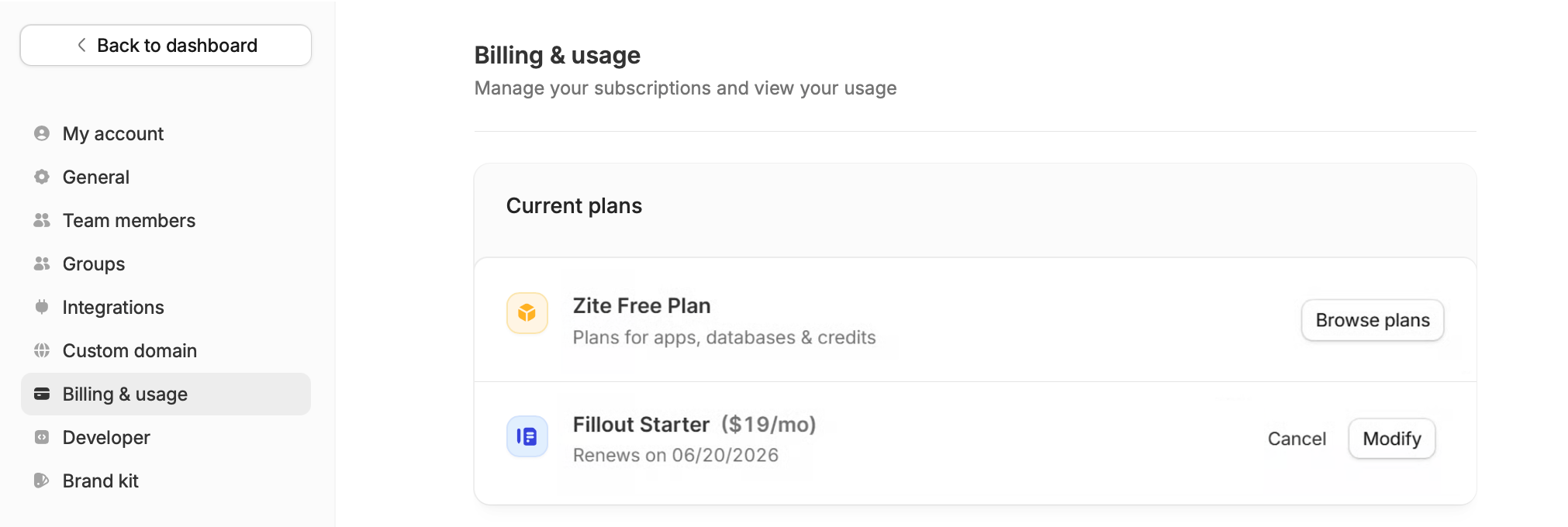
Alternatively, click your **Account name** on the upper left corner of your dashboard followed by `Settings`, then navigate to `Billing & usage`.
 ### Upgrade or downgrade your plan
If you're currently on a paid plan, click `Modify` to change your plan.
If you're on the Free plan, `Browse plans` to view and upgrade to a paid plan.
Fillout and Zite have separate subscription plans. Upgrading your Fillout plan doesn't automatically upgrade your Zite plan, and vice versa.
Your current plan remains active until the end of your billing cycle, whether you're on a monthly or annual subscription.
### **Payment methods**
The available payment methods depend on your plan.
* **Starter, Pro, Business, and Team:** Credit card only
* **Enterprise:** In addition to credit card payments, Enterprise customers can pay via wire transfers, purchase orders (POs), invoice payments, and ACH.
If you're interested in an Enterprise plan, please reach out to our team [here](https://www.fillout.com/enterprise).
### Cancel your plan
To cancel your Fillout plan, follow [this guide](https://www.fillout.com/help/cancel-plan).
### Opt out of auto-upgrade
If you add a credit card during your Fillout forms trial, your account will automatically upgrade at the end of your trial unless you opt out.
To opt out, [downgrade to the Free plan](/help/billing-and-payments#manage-your-plan) from the [**Billing & usage** page](https://build.fillout.com/home/settings/billing) before your trial ends. You won't be charged if you opt out before the trial expires.
After your trial ends, your account will continue on the plan you've selected.
## Download invoices
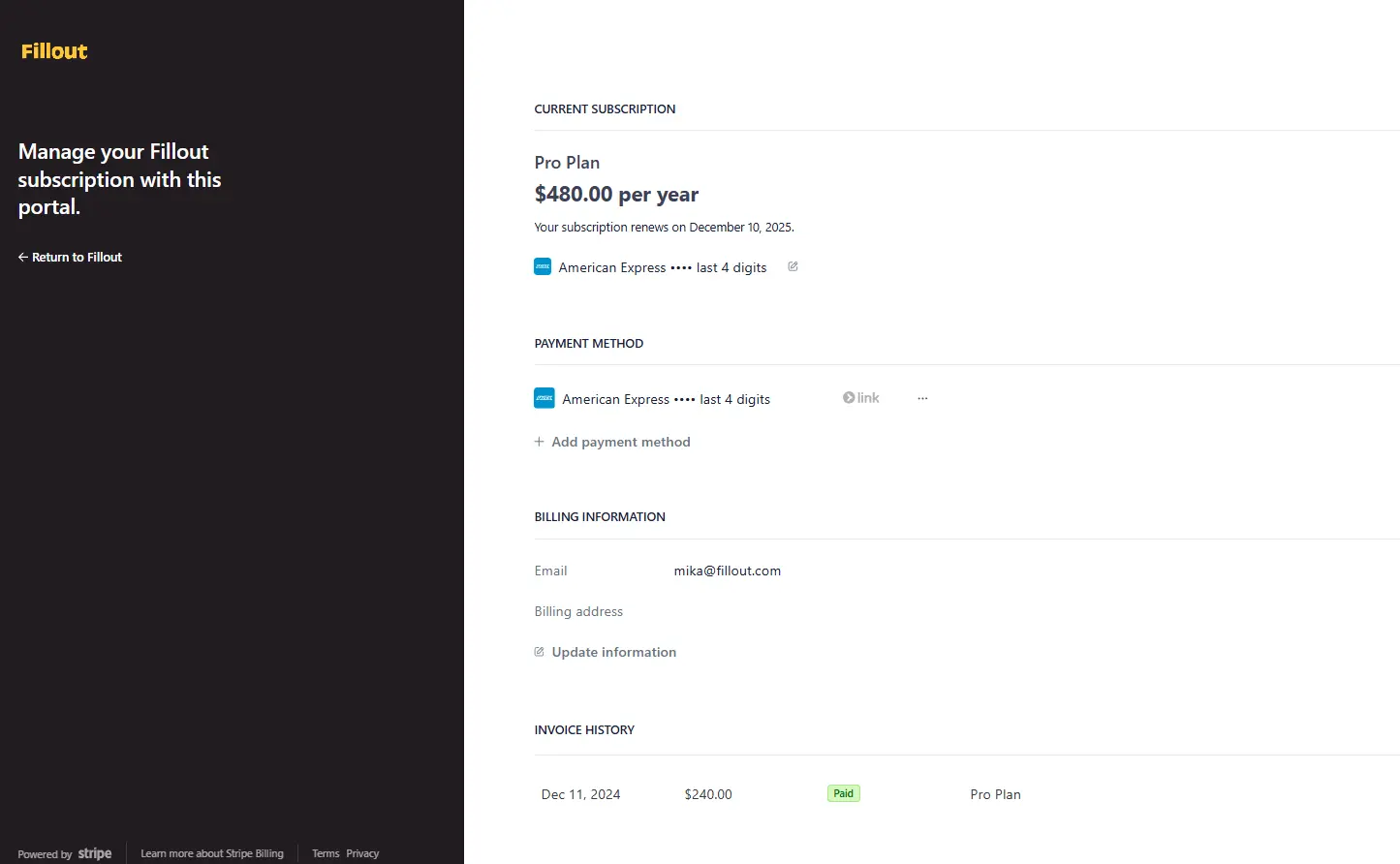
You can access your billing history including invoices in the [billing portal](https://app.fillout.com/home/settings/billing). Click on an invoice to download it.
### Upgrade or downgrade your plan
If you're currently on a paid plan, click `Modify` to change your plan.
If you're on the Free plan, `Browse plans` to view and upgrade to a paid plan.
Fillout and Zite have separate subscription plans. Upgrading your Fillout plan doesn't automatically upgrade your Zite plan, and vice versa.
Your current plan remains active until the end of your billing cycle, whether you're on a monthly or annual subscription.
### **Payment methods**
The available payment methods depend on your plan.
* **Starter, Pro, Business, and Team:** Credit card only
* **Enterprise:** In addition to credit card payments, Enterprise customers can pay via wire transfers, purchase orders (POs), invoice payments, and ACH.
If you're interested in an Enterprise plan, please reach out to our team [here](https://www.fillout.com/enterprise).
### Cancel your plan
To cancel your Fillout plan, follow [this guide](https://www.fillout.com/help/cancel-plan).
### Opt out of auto-upgrade
If you add a credit card during your Fillout forms trial, your account will automatically upgrade at the end of your trial unless you opt out.
To opt out, [downgrade to the Free plan](/help/billing-and-payments#manage-your-plan) from the [**Billing & usage** page](https://build.fillout.com/home/settings/billing) before your trial ends. You won't be charged if you opt out before the trial expires.
After your trial ends, your account will continue on the plan you've selected.
## Download invoices
You can access your billing history including invoices in the [billing portal](https://app.fillout.com/home/settings/billing). Click on an invoice to download it.
 ## Refunds
For information about refunds, please refer to our [Refund Policy](https://www.fillout.com/help/refund-policy).
## FAQs
No, Fillout and Zite have separate subscription plans, so canceling one won't affect the other.
Downgrades take effect at the end of your billing cycle, and you won’t be charged afterward unless you upgrade again. Enterprise customers should contact their account manager or email [support@fillout.com](mailto:support@fillout.com)
There isn't currently a way to change or remove your payment method yourself. If you'd like to update or remove it, our Support team will be happy to help. Send us a message at [**support@fillout.com**](mailto:support@fillout.com)
Currently, only organization admins can access billing.
## Refunds
For information about refunds, please refer to our [Refund Policy](https://www.fillout.com/help/refund-policy).
## FAQs
No, Fillout and Zite have separate subscription plans, so canceling one won't affect the other.
Downgrades take effect at the end of your billing cycle, and you won’t be charged afterward unless you upgrade again. Enterprise customers should contact their account manager or email [support@fillout.com](mailto:support@fillout.com)
There isn't currently a way to change or remove your payment method yourself. If you'd like to update or remove it, our Support team will be happy to help. Send us a message at [**support@fillout.com**](mailto:support@fillout.com)
Currently, only organization admins can access billing.