> ## Documentation Index
> Fetch the complete documentation index at: https://fillout.com/help/llms.txt
> Use this file to discover all available pages before exploring further.
# Condition groups
> Use condition groups to show, hide and validate fields based on multiple conditions at once. Use nested logic to encode any condition you need in your form.
## Show based on a condition group
Click the question or field's to open the right-hand panel. Under **Logic**, `Set conditional logic` to `+ Add condition group`.
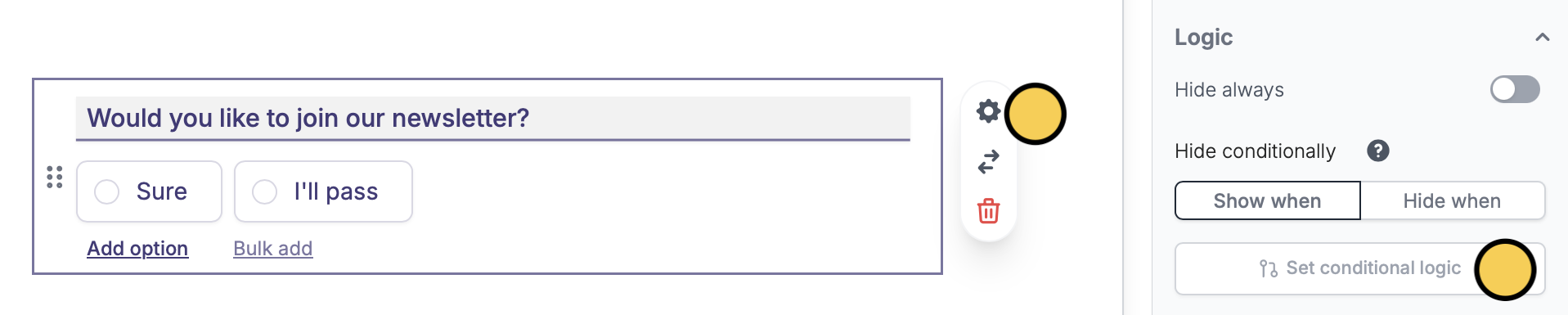 You can also hide based on a condition group. Simply switch to `Hide when`.
### And function
If you choose `and`, all conditions set must be true to show (default) or hide a field.
You can also hide based on a condition group. Simply switch to `Hide when`.
### And function
If you choose `and`, all conditions set must be true to show (default) or hide a field.
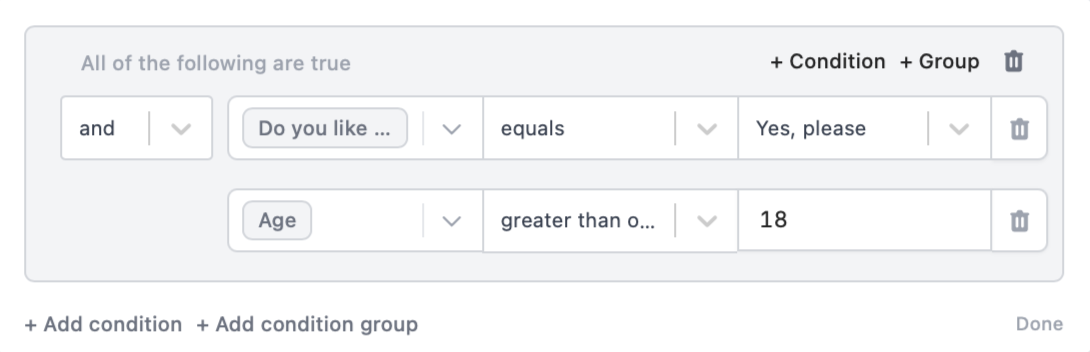 For example, the "Would you like to join our newsletter?" question above will only `Show when` the respondent:
1. Answers "Yes, please" to "Do you like to get updates on our discounts and promotions?"
AND
2. Is "18 years old and above"
You can auto-compute for the Age using a birthday field. Learn how [here](https://www.fillout.com/help/calculations#compute-duration).
### Or function
Now, let's use `or`. With this, as long as one condition is true, a question or field can be shown or hidden.
For example, the "Would you like to join our newsletter?" question above will only `Show when` the respondent:
1. Answers "Yes, please" to "Do you like to get updates on our discounts and promotions?"
AND
2. Is "18 years old and above"
You can auto-compute for the Age using a birthday field. Learn how [here](https://www.fillout.com/help/calculations#compute-duration).
### Or function
Now, let's use `or`. With this, as long as one condition is true, a question or field can be shown or hidden.
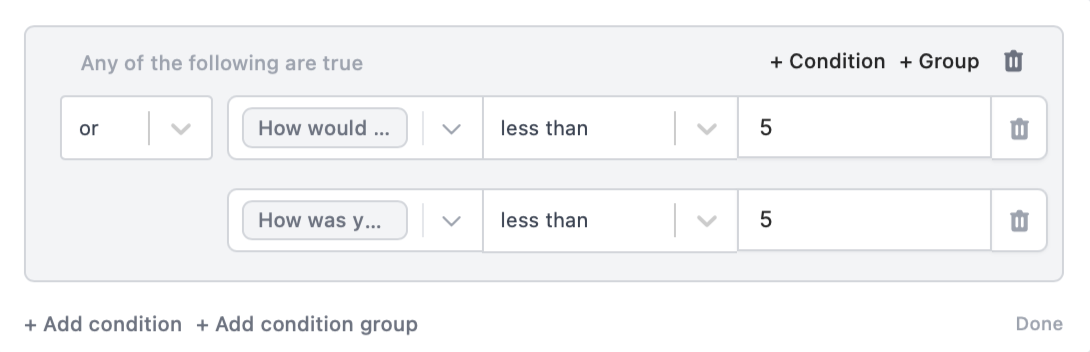 For example, the "How can we improve?" field will `Show when` a customer:
* Rates "less than 5 stars" on "How would you rate our service?"
OR
* Rates "less than 5 stars" on "How was your shopping experience?"
### Nested conditions
You can also create a condition group using both `and` and `or` functions.
For example, the "How can we improve?" field will `Show when` a customer:
* Rates "less than 5 stars" on "How would you rate our service?"
OR
* Rates "less than 5 stars" on "How was your shopping experience?"
### Nested conditions
You can also create a condition group using both `and` and `or` functions.
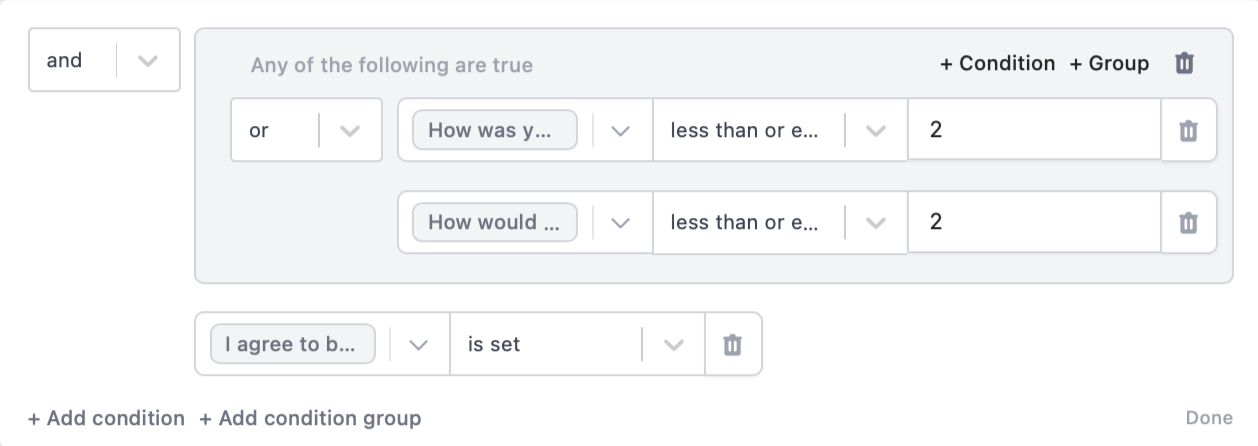 For example, we'll make the "Would you like to further discuss in a call?" `Show when` a customer:
1. Rates "less than 2 stars" on "How would you rate our service?"
OR
Rates "less than 2 stars" on "How was your shopping experience?"
AND
2. Opted to "be contacted"
You can copy and paste conditional logic across pages. If you copy a field with conditions set or duplicate it, its existing conditions get carried over.
## Related articles
Hide or show fields based on answers, URL parameters or data.
Calculate prices for order forms, compute quiz scores, and more.
Perform an integration only when a certain condition is met.
For example, we'll make the "Would you like to further discuss in a call?" `Show when` a customer:
1. Rates "less than 2 stars" on "How would you rate our service?"
OR
Rates "less than 2 stars" on "How was your shopping experience?"
AND
2. Opted to "be contacted"
You can copy and paste conditional logic across pages. If you copy a field with conditions set or duplicate it, its existing conditions get carried over.
## Related articles
Hide or show fields based on answers, URL parameters or data.
Calculate prices for order forms, compute quiz scores, and more.
Perform an integration only when a certain condition is met.