> ## Documentation Index
> Fetch the complete documentation index at: https://fillout.com/help/llms.txt
> Use this file to discover all available pages before exploring further.
# Fillout form field types
> With Fillout, you can use over 50 different question or field types to make your forms. Easily customize or change field types, add captions and default values, and use logic.
export const SupportBanner = () => {
const titleId = React.useId();
return ;
};
## How to add a field
Simply click or drag and drop your chosen **field type** from the left-hand panel, then type your question or text.
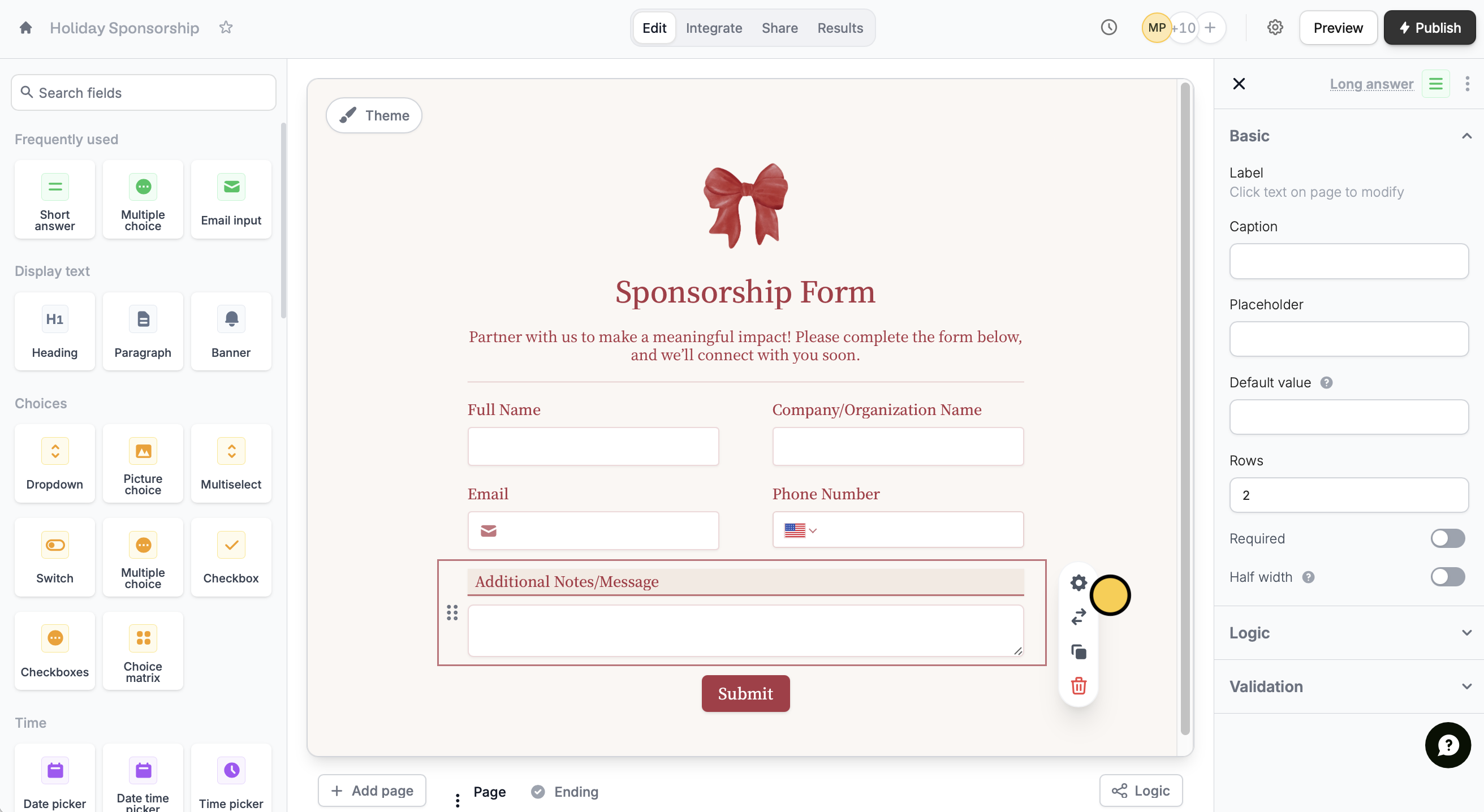 Each field is highly customizable. Just click on any field followed by its to open the right-hand panel.
Deleting a form field will automatically remove any existing responses to that field. It will no longer appear on the Results page.
Add supporting details, make it required, set up [**conditional logic**](/help/conditional-hiding), and more. You can also easily [copy and paste](/help/copy-paste-fields) or [duplicate](/help/duplicate-fields) your field types.
## Change field type
Click a field followed by to select a different field type.
Switching to a suggested field type keeps your current settings. It only works with compatible types that support the same answers (e.g., Multiselect → Checkboxes, Multiple Choice → Dropdown).
## List of field types
| **Field type** | **Purpose** |
| ------------------------------------------------------------------------------------------------- | ---------------------------------------------------------------------------------------------------------- |
| Short answer | Collect a single line of text response |
| Multiple choice | Present a list of choices to select only one option from |
| Email input | Collect an email address |
| Text | Display a block of text |
| Phone number | Collect a phone number |
| [Address](/help/address) | Collect a mailing address |
| [Heading](/help/heading) | Display a heading in the largest size |
| Paragraph | Display a formattable block of text in a paragraph format |
| [Banner](/help/banners) | Display a banner image or message |
| Dropdown | Present a list of options in a dropdown menu format |
| [Picture choice](https://www.fillout.com/help/image-gif#add-images-to-choices) | Show a set of image options to select from |
| Multiselect | Present a list of options to choose from, with the ability to select multiple options |
| Switch | Show a toggle switch to turn an option on or off |
| Checkbox | Show a yes or no question, like a terms of service agreement checkbox |
| Checkboxes | Present a list of options to choose from, with the ability to tick multiple options |
| Rich text | Collect responses with formatting options like headings, bullet points, and text styling |
| [Record picker](https://www.fillout.com/help/record-pickers) | Present a list of records to select from (only for forms connected to a database like Airtable and Notion) |
| [Submission picker](/help/submission-picker) | Enable pre-filling of forms with responses from another form |
| [Choice matrix](/help/matrix) | Collect a grid of selections from corresponding rows and columns |
| [Date picker](https://www.fillout.com/help/date-range) | Collect a date value |
| [Date time picker](https://www.fillout.com/help/date-range) | Collect a date and time value |
| Time picker | Collect a time value |
| [Date range](/help/date-range) | Collect a start and end date |
| [Ranking](/help/ranking) | Show a list of options to rank |
| [Star Rating](/help/rating) | Show a star rating system to rate an attribute |
| [Slider](/help/rating) | Show a sliding control to select a value from a range |
| [Opinion scale](/help/rating) | Show a predefined scale to express opinion on a topic |
| Long answer | Collect a longer text response, such as a paragraph or a list |
| Number | Collect a numerical value |
| [Currency](/help/currency) | Collect a monetary amount |
| [URL](/help/add-links-to-form) | Request for website links |
| Color picker | Present a predefined set of options or using a color picker interface |
| Password | Collect a password |
| [File uploader](/help/file-upload) | Collect file uploads |
| [Signature](/help/esignatures) | Request for a free-form or upload of a signature |
| [Voice recording](/help/voice-recording) | Request voice recordings and automatically transcribe them |
| [Subforms](/help/subforms) | Collect information on nested forms within your main form |
| [Captcha](/help/captcha) | Present respondents with a challenge to prove they are human and not a bot |
| [Location coordinates](/help/location-coordinates) | Collect geographic location coordinates |
| [Section collapse](/help/section-collapse) | Allow respondents to show or hide a section of the form |
| Divider | Display a horizontal line to visually separate content on your form |
| [HTML](/help/html-css) | Control the layout of your form elements and add custom styles to it |
| [**Image**](/help/image-gif) | Display an image or GIF by uploading one or choosing from a gallery |
| [Video](/help/video) | Display a video |
| [PDF Viewer](/help/embed-pdfs) | Display a PDF document |
| [Progress bar](/help/progress-bar) | Show a visual indicator to help respondents track their completion |
| [Fill again button](/help/fill-again-button) | Let respondents fill out your form multiple times (only on ending pages) |
| Send response | Let respondents receive a copy of their responses via email (only on ending pages) |
| Download PDF | Let respondents download the PDF copy generated after completing their form (only on ending pages) |
| [Table](/help/table) | Collect data in a spreadsheet-like format with multiple rows and columns |
| [Social media links](/help/social-media) | Add buttons that link to your social media pages, messaging channels, portfolios, and more |
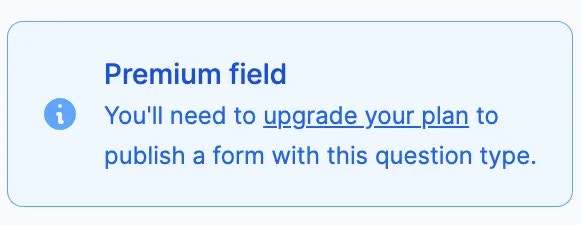
Question types with the symbol are available to users in the **Starter**, **Pro**, **Business**, and **Enterprise** [plans](https://www.fillout.com/pricing). If you are on the **Free** plan, the pop-up below will show up for these fields.
Each field is highly customizable. Just click on any field followed by its to open the right-hand panel.
Deleting a form field will automatically remove any existing responses to that field. It will no longer appear on the Results page.
Add supporting details, make it required, set up [**conditional logic**](/help/conditional-hiding), and more. You can also easily [copy and paste](/help/copy-paste-fields) or [duplicate](/help/duplicate-fields) your field types.
## Change field type
Click a field followed by to select a different field type.
Switching to a suggested field type keeps your current settings. It only works with compatible types that support the same answers (e.g., Multiselect → Checkboxes, Multiple Choice → Dropdown).
## List of field types
| **Field type** | **Purpose** |
| ------------------------------------------------------------------------------------------------- | ---------------------------------------------------------------------------------------------------------- |
| Short answer | Collect a single line of text response |
| Multiple choice | Present a list of choices to select only one option from |
| Email input | Collect an email address |
| Text | Display a block of text |
| Phone number | Collect a phone number |
| [Address](/help/address) | Collect a mailing address |
| [Heading](/help/heading) | Display a heading in the largest size |
| Paragraph | Display a formattable block of text in a paragraph format |
| [Banner](/help/banners) | Display a banner image or message |
| Dropdown | Present a list of options in a dropdown menu format |
| [Picture choice](https://www.fillout.com/help/image-gif#add-images-to-choices) | Show a set of image options to select from |
| Multiselect | Present a list of options to choose from, with the ability to select multiple options |
| Switch | Show a toggle switch to turn an option on or off |
| Checkbox | Show a yes or no question, like a terms of service agreement checkbox |
| Checkboxes | Present a list of options to choose from, with the ability to tick multiple options |
| Rich text | Collect responses with formatting options like headings, bullet points, and text styling |
| [Record picker](https://www.fillout.com/help/record-pickers) | Present a list of records to select from (only for forms connected to a database like Airtable and Notion) |
| [Submission picker](/help/submission-picker) | Enable pre-filling of forms with responses from another form |
| [Choice matrix](/help/matrix) | Collect a grid of selections from corresponding rows and columns |
| [Date picker](https://www.fillout.com/help/date-range) | Collect a date value |
| [Date time picker](https://www.fillout.com/help/date-range) | Collect a date and time value |
| Time picker | Collect a time value |
| [Date range](/help/date-range) | Collect a start and end date |
| [Ranking](/help/ranking) | Show a list of options to rank |
| [Star Rating](/help/rating) | Show a star rating system to rate an attribute |
| [Slider](/help/rating) | Show a sliding control to select a value from a range |
| [Opinion scale](/help/rating) | Show a predefined scale to express opinion on a topic |
| Long answer | Collect a longer text response, such as a paragraph or a list |
| Number | Collect a numerical value |
| [Currency](/help/currency) | Collect a monetary amount |
| [URL](/help/add-links-to-form) | Request for website links |
| Color picker | Present a predefined set of options or using a color picker interface |
| Password | Collect a password |
| [File uploader](/help/file-upload) | Collect file uploads |
| [Signature](/help/esignatures) | Request for a free-form or upload of a signature |
| [Voice recording](/help/voice-recording) | Request voice recordings and automatically transcribe them |
| [Subforms](/help/subforms) | Collect information on nested forms within your main form |
| [Captcha](/help/captcha) | Present respondents with a challenge to prove they are human and not a bot |
| [Location coordinates](/help/location-coordinates) | Collect geographic location coordinates |
| [Section collapse](/help/section-collapse) | Allow respondents to show or hide a section of the form |
| Divider | Display a horizontal line to visually separate content on your form |
| [HTML](/help/html-css) | Control the layout of your form elements and add custom styles to it |
| [**Image**](/help/image-gif) | Display an image or GIF by uploading one or choosing from a gallery |
| [Video](/help/video) | Display a video |
| [PDF Viewer](/help/embed-pdfs) | Display a PDF document |
| [Progress bar](/help/progress-bar) | Show a visual indicator to help respondents track their completion |
| [Fill again button](/help/fill-again-button) | Let respondents fill out your form multiple times (only on ending pages) |
| Send response | Let respondents receive a copy of their responses via email (only on ending pages) |
| Download PDF | Let respondents download the PDF copy generated after completing their form (only on ending pages) |
| [Table](/help/table) | Collect data in a spreadsheet-like format with multiple rows and columns |
| [Social media links](/help/social-media) | Add buttons that link to your social media pages, messaging channels, portfolios, and more |
Question types with the symbol are available to users in the **Starter**, **Pro**, **Business**, and **Enterprise** [plans](https://www.fillout.com/pricing). If you are on the **Free** plan, the pop-up below will show up for these fields.
 ## Related articles
Build forms faster by duplicating existing questions or fields.
Hide or show fields based on answers, URL parameters or data.
Assign different values to the choices shown to respondents.
## Related articles
Build forms faster by duplicating existing questions or fields.
Hide or show fields based on answers, URL parameters or data.
Assign different values to the choices shown to respondents.