

Interactive demo
Spreadsheet & database
Create an Airtable form
Make new or update existing Airtable bases with a custom Fillout form.
Sync responses to Microsoft Excel
Enable automatic syncing of form responses to an Excel sheet online.
Create a Google Sheets form
Sync responses from your Fillout form to a Google Sheet in under 30 seconds.
Sync form responses to Monday
Create leads, orders, projects and custom objects in Monday.
Create a Notion form
Create or update existing Notion databases and embed your forms.
Create a SmartSuite form
Automatically send responses from your form to a SmartSuite solution.
CRM
Create an Attio form
Save Attio contacts, companies, deals and custom CRM records with a form.
Create a HubSpot form
Create or update existing HubSpot contacts and embed your forms.
Create a Salesforce form
Add or update your Salesforce records with a Fillout form.
Sync deals and leads to Pipedrive
Make deals, people, and organizations in Pipedrive with a Fillout form.
Social media
Track submissions with Meta Pixels
Use a pixel to track when respondents open your form, click pages, and more.
File sharing
Sync file uploads to Amazon S3
Upload file submissions automatically to an Amazon S3 bucket.
Sync file uploads to Dropbox
Upload file submissions automatically to a Dropbox folder with your form.
Upload files to Google Drive
Automatically upload files in a Google Drive folder through a Fillout form.
Sync files to OneDrive
Upload file submissions automatically to a OneDrive folder with your form.
Messaging
Send messages to Discord channels
See an overview of form responses or choose a custom message.
Send notifications to Teams
View a summary of responses within the Teams app.
Connect to Slack
Get a formatted notification or custom message upon form submissions.
Send messages with Twilio
Automate SMS updates and notifications to respondents.
Customer support
Create new Intercom tickets
Make new messages in Intercom from a form, and create or update leads.
Create new Zendesk tickets
Make new Zendesk support tickets associated with new leads from a form.
Analytics
Track conversion data in Google Ads
Upload address, phone number, GCLID and email to optimize Ad bidding.
Track data with Google Tag Manager
Check conversions and ROI through form responses in your website.
Email marketing
Connect to ActiveCampaign
Add new and update existing ActiveCampaign contacts from a form.
Create new contacts in Brevo
Add new contacts in Brevo or update existing ones with a Fillout form.
Connect to Klaviyo
Add new Klaviyo contacts and update existing ones from a Fillout form.
Connect to Mailchimp
Add and update new and existing Mailchimp contacts from a Fillout form.
Notify using SendGrid
Send customizable email notifications after respondents submit your form.
Project management
Connect to ClickUp
Automatically create and manage tasks in ClickUp upon form submissions.
Connect to Linear
Create new issues on Linear with a form. Set the priority, status, and more.
Sync form responses to Monday
Create leads, orders, projects and custom objects in Monday.
Connect to Trello
Create new cards on Trello whenever someone submits your Fillout form.
Others
Create Google Docs
Generate custom Google Docs every time your form is completed.
Generate PDFs
Autofill and sign PDFs + documents with form submissions.
Send form submissions to a webhook
Send responses to automation tools or any other Webhook endpoint.
Integration guides
Guides for getting the most out of the Fillout integrations.Manage integrations
Edit or remove connections in your organization.
Update linked records
Let respondents update linked records in databases.
Use dynamic data
Display dynamic content and use it to hide, validate and pre-fill fields.
Pre-fetch dynamic data
Fetch information from Airtable, Notion or any service before your form loads.
Update database records
Use a pre-filled form to update based on existing responses.
Write a static value to an integration
Send a fixed value to Airtable, Notion or another integration for any field.
Map Fillout fields to integrations
Configure form fields and values to send to database integrations.
Working with form submission IDs
Link submissions back to Fillout by referencing its Submission ID.
Enable integration error notifications
Sometimes, using third-party integrations can lead to unexpected errors. For example, their service might be down or take too long to respond. Fillout will still save all form responses, and it can also email you with details about the error! From your dashboard, click yourAccount name at the upper left corner followed by Settings.
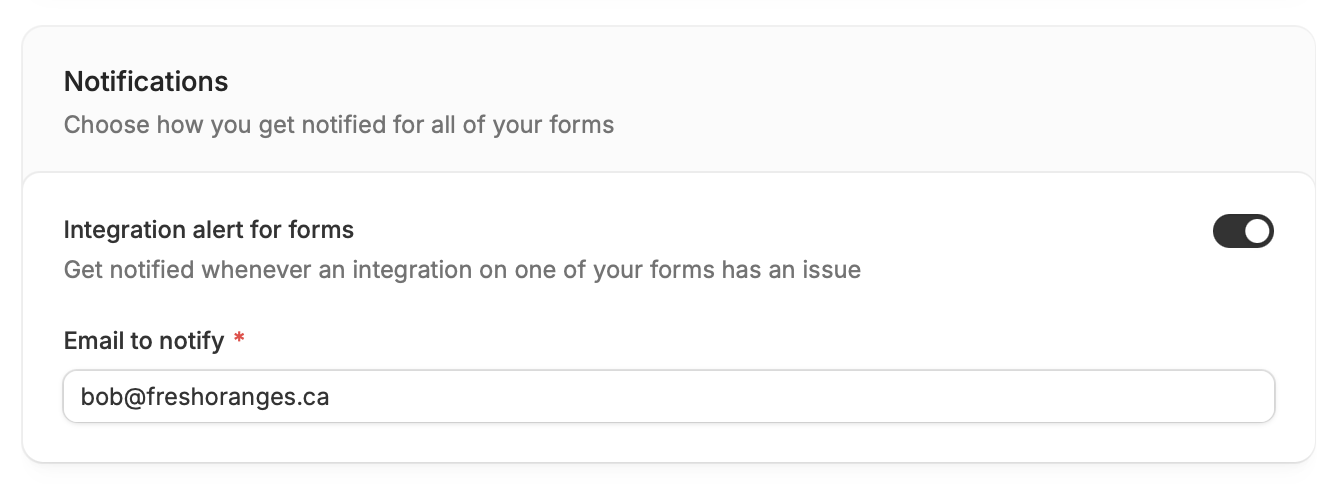
Integration alert for forms to enter your email.
Limit integration access
An integration (like Airtable, Google Sheets, or Slack) can have multiple accounts connected. By default, all connected accounts in an integration can be used by everyone in your organization across any form. If you want more control, you can turn onLimit integration access to creators at the bottom of the Settings page. This means only the person who connected a specific account (and admins) can use that account in forms.
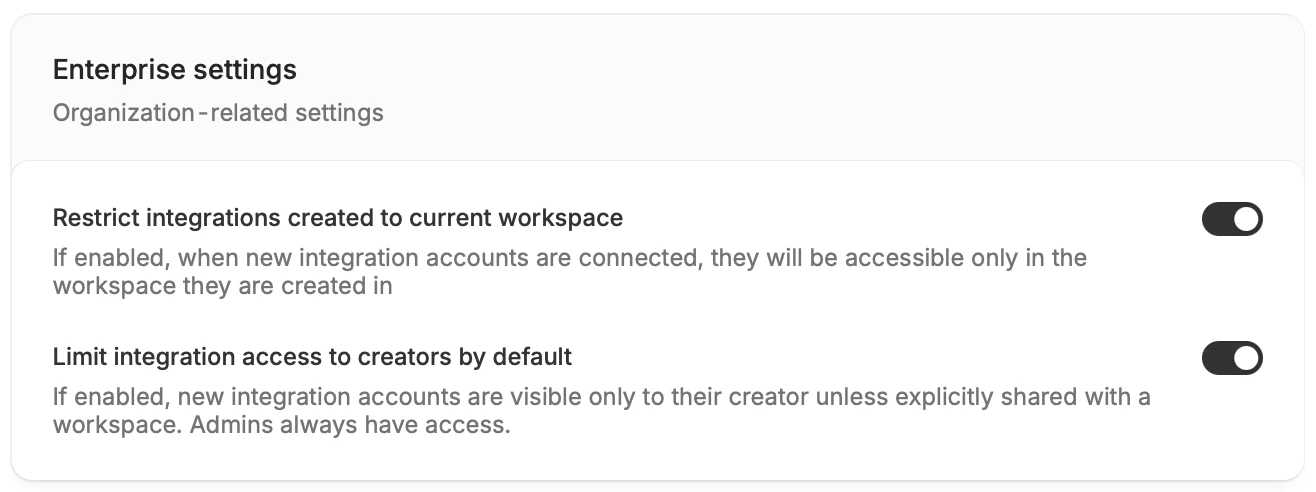
Restrict integrations created to current workspace. When enabled, connected accounts can only be used in forms created within the same workspace.
This feature is only available to Enterprise users. To learn more, click here.